
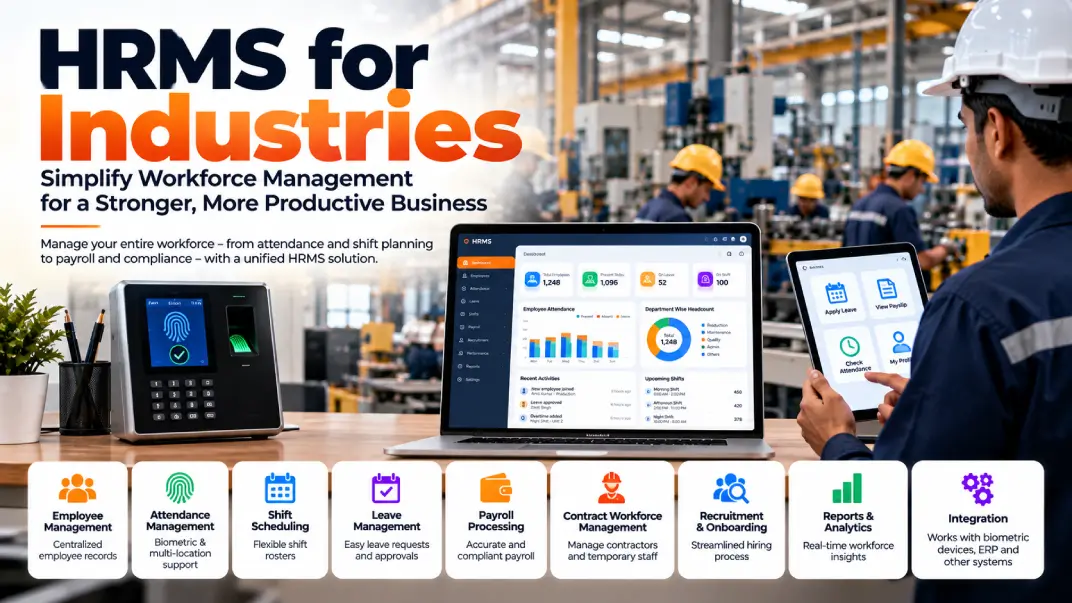
Managing employees in an industrial environment is very different from managing a small office team. Manufacturing companies, factories, warehouses, engineering units and industrial organisations often operate across multiple shifts, departments, plants and workforce categories.
HR teams must coordinate employee records, attendance, leave, shift schedules, overtime, payroll, recruitment, onboarding and statutory documentation while ensuring that business operations continue smoothly.
Managing these activities through spreadsheets, paper registers and disconnected software can lead to duplicated work, attendance discrepancies, payroll delays and limited visibility into workforce operations.
This is where an HRMS for industries becomes valuable.
An industry-focused Human Resource Management System (HRMS) helps organisations centralise employee information, automate HR processes and connect workforce management with business operations. For manufacturing companies in particular, the right HRMS can help coordinate factory-floor employees, office staff, contract workers and multiple locations through a more structured system.
In this guide, we explain what industrial HRMS software is, which features matter most, how it benefits manufacturing businesses, what to consider before implementation and how to choose the right HRMS software for your organisation.
What Is HRMS Software for Industries?
HRMS software for industries is a digital platform designed to manage employee information and HR processes in organisations with complex workforce requirements.
Unlike a basic employee database, an HRMS can bring multiple HR functions together in one system.
Depending on the software, these functions may include:
- Employee information management
- Recruitment and onboarding
- Attendance management
- Shift scheduling
- Leave management
- Payroll processing
- Overtime calculations
- Employee self-service
- Performance management
- Training and development
- Asset allocation
- HR reports and analytics
- Document management
- Workforce administration
For industrial businesses, additional requirements may include biometric attendance integration, contractor workforce records, plant-wise reporting, multiple shift patterns and location-specific payroll configuration.
The objective is to reduce manual HR work while improving the accuracy, accessibility and consistency of workforce information.
Why Do Manufacturing Companies Need an Industry-Specific HRMS?
Manufacturing companies often have workforce requirements that differ from those of office-based organisations.
A factory may employ permanent workers, supervisors, engineers, administrative staff, trainees and contract workers. These employees may work under different schedules and policies across departments or production facilities.
Several operational challenges can arise.
1. Managing Multiple Shifts
Factories may operate general shifts, rotating shifts, night shifts and extended production schedules.
HR teams need to know which employee is assigned to which shift, whether attendance matches the roster and how deviations should be handled.
An HRMS with configurable shift management can help organise these schedules and provide more consistent attendance records.
2. Tracking Attendance Across Locations
Manufacturing companies may have attendance devices at factory gates, production units, warehouses and offices.
Integrating attendance data with a central HRMS can reduce manual data entry and simplify consolidated reporting.
3. Calculating Overtime
Overtime calculations may depend on approved working hours, attendance records, employee categories and applicable rules.
A suitable system should allow the organisation to configure and validate these rules before payroll processing.
4. Managing Different Employee Categories
Permanent employees, fixed-term employees, trainees and contract workers may require different records, workflows and administrative processes.
An HRMS can help maintain organised employee information and apply the appropriate configured workflows.
5. Processing Payroll Accurately
Payroll may depend on attendance, approved overtime, leave, allowances, deductions and other salary components.
Integrating these records can reduce repeated data entry and make payroll verification more efficient.
6. Maintaining Employee Documentation
Industrial HR departments manage joining documents, identity information, employment records, training records and other employee-related documentation.
Centralised document management can make authorised retrieval and record maintenance easier.
Essential Features of HRMS for Manufacturing Industries
Not every HRMS includes every industrial feature. Before selecting a solution, manufacturers should assess the capabilities they actually require.
1. Employee Information Management
An employee database provides a central record for the workforce.
Useful capabilities include:
- Employee profiles
- Employee identification numbers
- Department and designation records
- Joining dates
- Employment status
- Reporting relationships
- Plant and location assignments
- Document storage
- Employee history
A centralised database can reduce duplicate records and help HR teams retrieve information more efficiently.
2. Attendance Management
Attendance is one of the most important components of manufacturing HRMS software.
Useful capabilities may include:
- Clock-in and clock-out records
- Attendance regularisation
- Late arrival tracking
- Early departure tracking
- Missing-punch management
- Attendance approvals
- Shift-wise attendance reports
- Integration with supported biometric devices
Some organisations may also require mobile or kiosk-based attendance, depending on their workforce and security policies.
3. Shift Management
A manufacturing HRMS should support the shift patterns used by the organisation.
Depending on the product, this may include:
- Fixed shifts
- Rotating shifts
- Night shifts
- Department-wise rosters
- Employee shift assignments
- Shift changes
- Weekly-off configuration
- Holiday schedules
- Attendance-to-roster comparison
The system should make it easy for authorised managers to review schedules and identify discrepancies.
4. Leave Management
An HRMS can digitise the leave application and approval process.
Common capabilities include:
- Leave policy configuration
- Leave balances
- Leave applications
- Approval workflows
- Holiday calendars
- Leave history
- Department-level visibility
- Leave information for payroll
Leave policies should be configured according to the organisation's applicable rules and employment arrangements.
5. Payroll Management
Payroll software helps HR and finance teams calculate employee salaries using configured salary structures and verified inputs.
Typical capabilities include:
- Salary structure management
- Earnings and deductions
- Attendance-linked calculations
- Approved overtime inputs
- Payslip generation
- Payroll reports
- Bank payment files, where supported
- Payroll approval workflows
- Historical payroll records
For Indian businesses, payroll configuration may also need to support applicable Provident Fund (PF), Employees' State Insurance (ESI), tax deduction and other statutory requirements.
Organisations should verify the software's current compliance capabilities and ensure that statutory rules are correctly configured.
6. Overtime and Working-Hour Management
Overtime is particularly important for businesses with extended operating schedules.
A suitable HRMS should help capture relevant working-hour information, connect it with attendance records and route exceptions for approval.
The applicable overtime calculation must follow the relevant legal provisions, employment category, state requirements and organisational policies. A software configuration should not be assumed to establish legal compliance by itself.
7. Contract Workforce Management
Some manufacturing organisations use contractors for housekeeping, maintenance, logistics, production support and other activities.
Depending on the scope, an HRMS may help maintain:
- Contract worker records
- Contractor details
- Workforce assignments
- Joining and exit records
- Attendance information
- Document expiry alerts
- Site or plant allocation
- Reports for authorised personnel
Businesses should check whether their chosen product supports contractor management directly or requires customisation or integration.
8. Recruitment and Onboarding
Manufacturing businesses may need to recruit employees for production, engineering, quality control, maintenance, logistics and administration.
Recruitment and onboarding modules can support:
- Candidate records
- Recruitment stages
- Interview scheduling
- Offer documentation
- Joining checklists
- Document collection
- Employee ID generation
- Department allocation
- Onboarding task tracking
Digital workflows can help HR teams coordinate new employee joining activities more consistently.
9. Employee Self-Service
An employee self-service portal or application allows employees to access selected HR information without depending on HR staff for every request.
Depending on the system, employees may be able to:
- View payslips
- Apply for leave
- Review attendance
- Submit regularisation requests
- Update permitted personal information
- Access HR policies
- View announcements
- Track request status
Mobile access can be especially useful when employees do not regularly use desktop computers.
10. HR Reports and Analytics
HR dashboards help authorised managers understand workforce information.
Useful reports may cover:
- Headcount
- Attendance
- Absenteeism
- Overtime
- Leave utilisation
- Employee turnover
- Recruitment progress
- Payroll summaries
- Department-wise workforce
- Plant-wise employee data
Reports should be based on accurate source data, with access controlled according to employee roles and business requirements.
HRMS for Different Industrial Sectors
Different industries have different workforce requirements. The right HRMS configuration depends on the nature of the operation.
Automotive and Auto Components
Automotive manufacturers may require shift rosters, attendance integration, workforce records, training documentation and plant-wise reporting.
Textile and Garment Manufacturing
Textile units may need to manage large workforces, shift schedules, attendance, leave, payroll inputs and employee records across production departments.
Pharmaceuticals
Pharmaceutical manufacturers may require employee training records, documentation, shift management, controlled access to HR information and support for internal audit processes.
Food Processing
Food processing facilities may operate across different production schedules and require structured attendance, leave, payroll and employee documentation.
Engineering and Heavy Manufacturing
Engineering companies may need workforce management across factories, workshops, warehouses, project locations and administrative offices.
Electronics Manufacturing
Electronics manufacturers may require department-wise workforce records, shift planning, attendance management and training coordination.
Warehousing and Logistics
Warehouses and logistics operations may need to manage multiple locations, shift-based workers, attendance, leave, employee records and operational reporting.
Construction and Infrastructure
Construction businesses may require workforce records across project sites, attendance tracking, contractor documentation and location-based reporting.
In each case, the company should identify its specific operational requirements before selecting an HRMS.
Cloud HRMS vs On-Premises HRMS for Industries
Industrial organisations should also consider how the software will be deployed.
| FactorCloud HRMSOn-Premises HRMS | ||
| Infrastructure | Hosted by the provider or its cloud partner | Hosted on the organisation's infrastructure |
| Access | Typically available through supported internet-connected devices | Depends on the organisation's network and configuration |
| Maintenance | Provider may manage much of the underlying infrastructure | Organisation generally manages more infrastructure responsibilities |
| Updates | Often delivered by the provider | May require planned internal deployment |
| Customisation | Depends on the product and its APIs | Depends on the product and deployment architecture |
| Control | Shared according to the hosting and service model | Greater direct infrastructure control, with corresponding responsibilities |
Neither option is automatically best for every manufacturer. Security, connectivity, integration, support, total cost and internal IT capabilities should guide the decision.
Benefits of HRMS Software for Manufacturing Companies
A well-implemented HRMS can deliver several operational benefits.
Reduced Manual Work
Automating routine processes can reduce repetitive spreadsheet updates, paper-based approvals and manual report preparation.
More Consistent Attendance Records
Centralised attendance information and supported device integrations can make it easier to identify missing punches, exceptions and discrepancies.
Better Payroll Preparation
Connecting attendance, leave and approved payroll inputs can reduce the need to re-enter information across multiple systems.
Improved Workforce Visibility
Plant-wise and department-wise reports help authorised managers review workforce information from a common platform.
Faster HR Workflows
Digital approval processes can make leave requests, onboarding and other employee-related workflows easier to track.
More Organised Documentation
Centralised records can help HR teams maintain employee documents and retrieve authorised information when needed.
Better Employee Experience
Self-service access can help employees find relevant information and submit requests through defined workflows.
These benefits depend on the software's capabilities, data quality, implementation, user adoption and the organisation's processes.
How to Choose the Best HRMS for Your Industry
Before purchasing HRMS software, prepare a requirements checklist.
1. Map your workforce. Identify employee numbers, locations, departments, shifts and employment categories.
2. Review attendance requirements. Check compatibility with your existing biometric devices, attendance machines or other time-capture methods.
3. Examine payroll needs. Document salary structures, allowances, deductions, overtime rules and applicable statutory requirements.
4. Check employee access. Decide whether employees need a mobile app, web portal, kiosk or a combination.
5. Review integrations. Determine whether the HRMS must connect with ERP, accounting, access-control, biometric or other systems.
6. Evaluate reporting. Confirm that the system can generate the plant-wise, department-wise and consolidated reports your managers need.
7. Assess security. Review role-based access, authentication, backups, audit logs, data handling and retention.
8. Understand implementation. Ask about data migration, configuration, training, testing and go-live support.
9. Check scalability. Ensure that the solution can accommodate additional employees, locations and workflows.
10. Calculate total cost. Include licences, implementation, integrations, hardware, support and any required customisation.
Request a demonstration using representative workflows from your organisation rather than relying only on a standard product presentation.
Common Mistakes to Avoid When Implementing an Industrial HRMS
Businesses can reduce implementation risks by avoiding these mistakes:
- Choosing software based only on price.
- Assuming that every HRMS supports factory shift patterns.
- Ignoring biometric-device compatibility.
- Failing to document overtime and payroll rules.
- Migrating employee data without validation.
- Overlooking contract workforce requirements.
- Providing insufficient employee and manager training.
- Failing to define user permissions.
- Assuming that software automatically guarantees statutory compliance.
- Not testing payroll calculations before the first live payroll run.
A phased implementation with realistic testing can help identify issues before they affect routine operations.
HRMS Software in India: What Should Businesses Check?
For Indian businesses, HRMS selection should consider the organisation's employment structure, workforce locations and applicable statutory requirements.
Depending on the business, these may involve:
- Provident Fund
- Employees' State Insurance
- Professional tax, where applicable
- Tax deduction and reporting
- Applicable minimum wages
- Working-hour and overtime requirements
- Leave and holiday rules
- Employee records and documentation
- Contract labour requirements, where applicable
The applicable rules can vary by establishment, employee category, jurisdiction and current legislation. Businesses should confirm that the HRMS supports the required configurations and obtain appropriate professional guidance when necessary.
TechQRT Payroll and HRMS Solution
TechQRT offers a Payroll and HRMS Solution designed to help organisations manage employee-related processes through a unified digital platform. The product listing describes capabilities across the employee lifecycle, including recruitment, time tracking, payroll processing and asset management.
For industrial businesses evaluating HRMS software, the next step is to map the organisation's requirements against the product's available capabilities.
Potential areas to evaluate include:
- Employee lifecycle management
- Employee records
- Attendance and time tracking
- Payroll workflows
- Asset management
- Employee access and permissions
- Reporting requirements
- Integration with existing business systems
Manufacturing companies should specifically confirm whether their required shift patterns, biometric devices, overtime rules, contractor workflows, multi-plant structures and statutory configurations are supported in the proposed deployment.
Where requirements extend beyond the available product features, the organisation should discuss integration or customisation options before finalising the project scope.
Looking for HRMS software for your industry? Contact TechQRT to discuss your workforce structure, attendance requirements, payroll processes and software integration needs.
Frequently Asked Questions
What is HRMS software for industries?
HRMS software for industries is a digital platform that helps organisations manage employee records, attendance, shifts, leave, payroll, recruitment and other HR processes. Industrial implementations may also require support for factory attendance, multiple shifts, contractor records and multiple locations.
Which HRMS features are important for manufacturing companies?
Important features may include employee management, attendance, shift scheduling, leave, payroll, overtime inputs, biometric integration, employee self-service, reporting and multi-location support.
Can HRMS software manage factory shift workers?
Some HRMS platforms support fixed, rotating and night shifts. Businesses should confirm that the selected software supports their actual roster patterns and required attendance rules.
Can an HRMS integrate with biometric attendance devices?
Many HRMS products support selected biometric devices or attendance systems. Compatibility depends on the device model, integration method and software configuration.
Is HRMS useful for small manufacturing businesses?
Yes. Small manufacturers can benefit from centralised employee records, attendance, leave and payroll workflows. The best solution depends on workforce size, complexity, budget and future requirements.
Can HRMS manage employees across multiple plants?
Some systems support multiple plants, branches and departments under one platform. Businesses should confirm how location-specific access, attendance, reporting and payroll configuration are handled.
Does HRMS software automatically ensure labour-law compliance?
No. Software can support calculations, records and workflows, but compliance depends on correct configuration, current rules, accurate information and appropriate review.
What is the difference between HRMS and payroll software?
Payroll software focuses primarily on salary calculations, payslips and related payroll processes. HRMS generally covers a broader range of employee lifecycle and HR functions, although product capabilities vary.
How much does HRMS software cost in India?
Pricing depends on the number of employees, modules, deployment model, implementation, integrations, hardware and support. Businesses should request a proposal based on their specific requirements.
Does TechQRT provide HRMS software?
TechQRT lists a Payroll and HRMS Solution among its digital products. Organisations should discuss their workforce requirements with TechQRT to confirm feature fit, configuration and implementation scope.
An HRMS for industries should do more than maintain employee records. It should help organisations connect attendance, shifts, payroll, employee information, approvals and reporting in a structured system.
For manufacturing companies, the most important considerations often include factory attendance, shift management, overtime, payroll inputs, workforce categories, multiple locations and applicable compliance requirements.
The best HRMS is the one that fits the organisation's actual processes, integrates with its existing systems and can grow with its operational requirements.
If your business is evaluating HRMS software for manufacturing companies in India, begin by documenting your workforce structure, essential features and integration needs. Then evaluate the available solutions against those requirements.
TechQRT's Payroll and HRMS Solution is one option to explore when assessing how a unified digital platform can support employee lifecycle management, time tracking, payroll and asset management.
Ready to streamline your HR operations? Contact TechQRT to discuss an HRMS solution aligned with your business requirements.